PNG vs SVG: Which Image Format Should You Use?
PNG and SVG both support transparency and both look crisp, so it's easy to treat them as interchangeable. They're not. The right choice comes down to one fundamental difference: raster versus vector.
Key takeaways
- PNG is raster — a fixed grid of pixels, ideal for photos and detail.
- SVG is vector — math-defined shapes that scale infinitely.
- Use SVG for logos, icons and illustrations.
- Use PNG for photographs and complex, non-scalable imagery.
Raster vs vector — the core difference

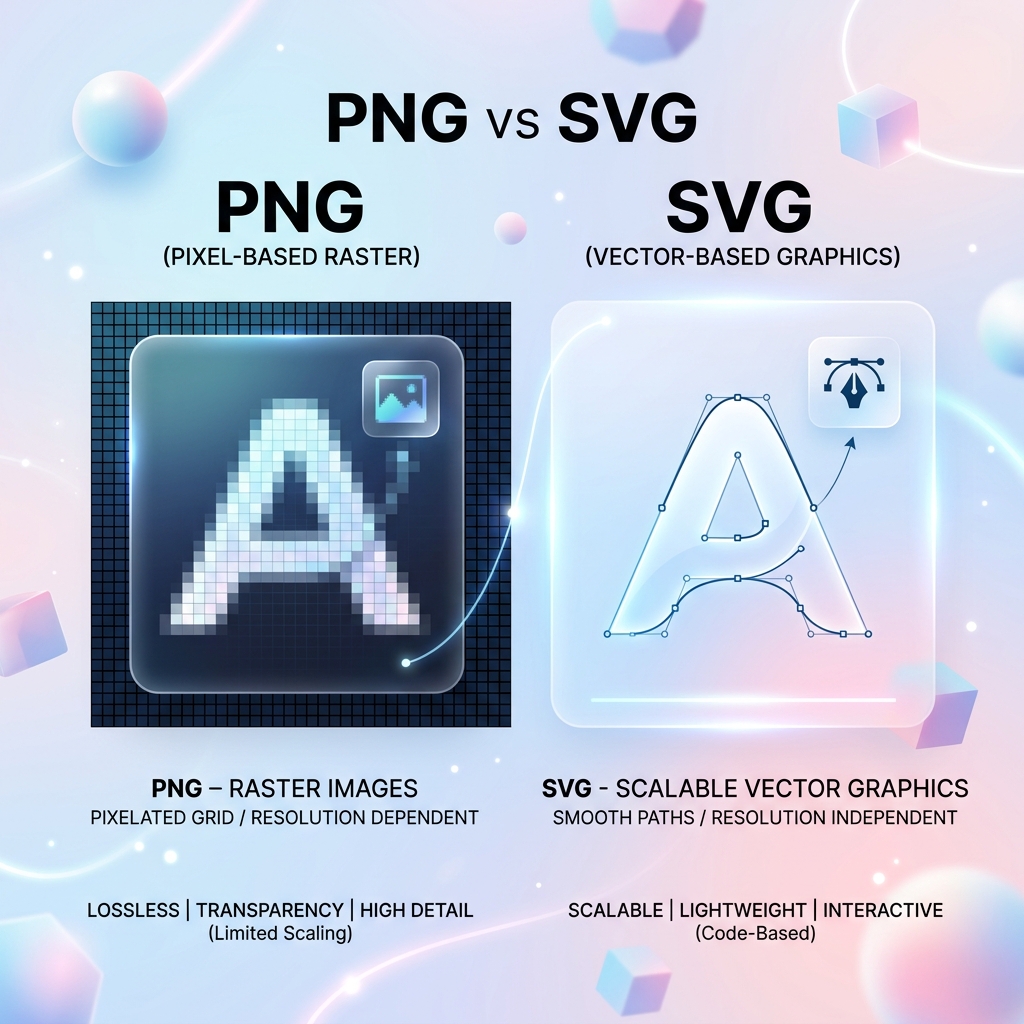
A PNG stores an image as a fixed grid of coloured pixels. Zoom in far enough and you'll see those pixels — the image can't add detail it doesn't have. An SVG, by contrast, stores an image as mathematical instructions: 'draw a circle here, a line there.' The browser renders those instructions freshly at any size.
This is why an SVG logo stays razor-sharp on a tiny favicon or a giant billboard, while a PNG blurs when scaled beyond its native resolution.
When SVG wins
For anything made of clean shapes — logos, icons, illustrations, charts — SVG is the clear winner. It's resolution-independent, usually tiny in file size, and can be styled and animated with CSS. It's the backbone of crisp, responsive interfaces.
The catch: SVG struggles with photographic detail, where describing every subtle colour variation as shapes becomes impractical.
When PNG wins
PNG excels at exactly what SVG can't do: photographs, screenshots and detailed imagery with complex colour and texture. It also supports full alpha transparency, making it perfect for cut-outs and images that sit over varied backgrounds.
The rule of thumb is simple: if it's drawn from shapes, reach for SVG; if it's captured or richly detailed, reach for PNG.
Gowtham
Solo developer and creator, writing clear guides and building tools so you always have current, trustworthy content.